Java
Maven
OnlyOffice
SpringBoot
使用 OnlyOffice 官方 Spring 示例遇到的坑
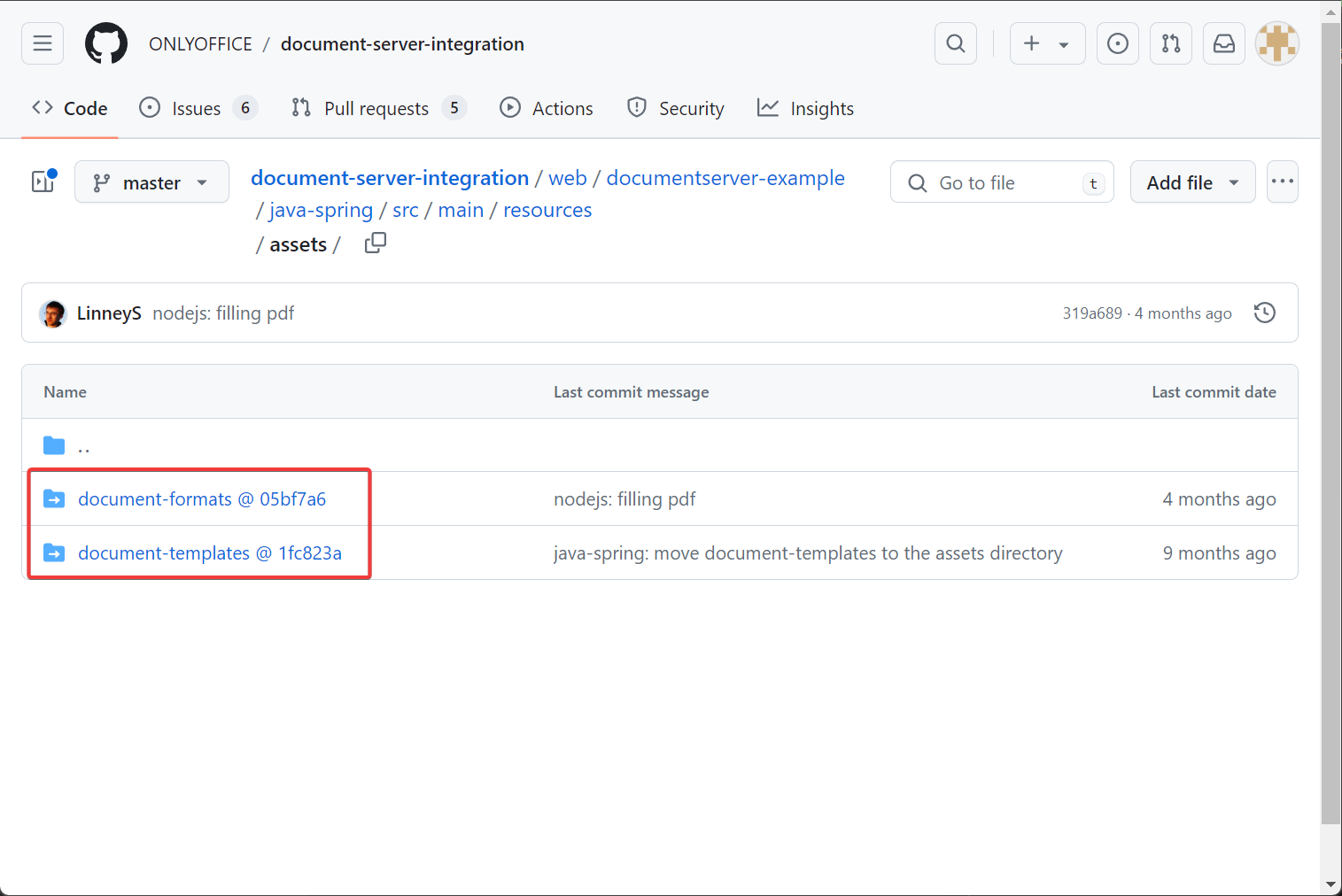
1. GitHub 下载下来的代码中 resources 目录缺失
这是由于 web/documentserver-example/java-spring/src/main/resources 下的两个目录不属于这个 GitHub 仓库,是 submodule :
clone --recurse-submodules https://github.com/ONLYOFFICE/document-server-integration.git
2. 如何用 IDEA 将项目编译成 jar 包
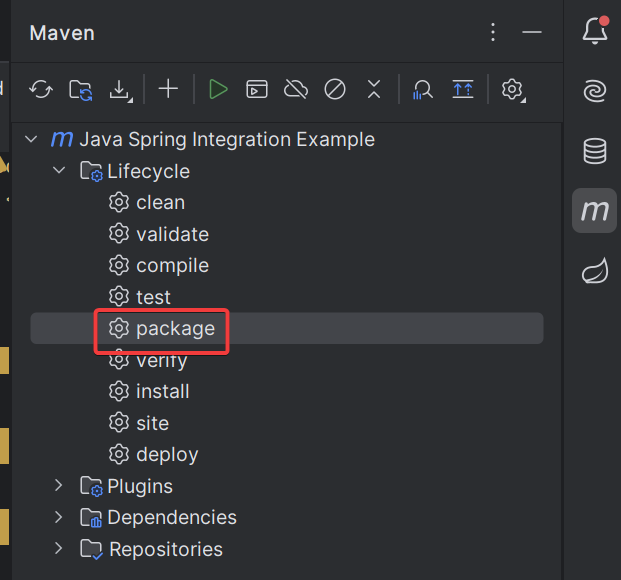
项目加载到 IDEA 后,点开 maven 的标签页,鼠标双击这个 package :
jar 包会生成在 target/integration-1.0.jar,复制即可使用。
3. 项目打包成 jar 后单独运行报错
项目打包成 jar 包单独运行会报错 FileNotFoundException ,原因有 2 个,首先是 resources 目录没有被打包进入 jar 包,解决方法为修改 pom.xml ,在 build 中加入:
<resources>
<resource>
<directory> ${basedir}/src/main/resources</directory>
</resource>
</resources>
其次是 src/main/java/com/onlyoffice/integration/documentserver/util/service/DefaultFormatService.java 中这一行使用的 getFile() 方法在 jar 包中不适用:
File targetFile = resourceFile . getFile ();
需要将这一行修改为以下几行:
InputStream inputStream = resourceFile . getInputStream ();
File targetFile = File . createTempFile ( "onlyoffice-docs-formats" , ".json" );
try ( FileOutputStream outputStream = new FileOutputStream ( targetFile )) {
final int bufferLength = 1024 ;
byte [] buffer = new byte [ bufferLength ] ;
int bytesRead ;
while (( bytesRead = inputStream . read ( buffer )) != - 1 ) {
outputStream . write ( buffer , 0 , bytesRead );
}
}
同时需要导入额外的以下两个包:
import java.io.FileOutputStream ;
import java.io.InputStream ;
4. 文档上传大小限制修改
默认的文档上传限制过小,有些大文档上传会报错,需要修改 src/main/resources/application.properties :
filesize-max = 5242880
spring.servlet.multipart.max-file-size = 50MB
spring.servlet.multipart.max-request-size = 50MB
将以上三个参数修改为原来的 10 倍。
5. 修改为使用 MySQL 数据库
默认情况下这个 Spring 示例使用在内存中的 h2 数据库,需要将其修改为使用 MySQL ,需要修改 src/main/resources/application.properties ,将以下几行:
spring.datasource.url = jdbc:h2:mem:usersdb
spring.datasource.driverClassName = org.h2.Driver
spring.datasource.username = sa
spring.datasource.password = password
spring.jpa.database-platform = org.hibernate.dialect.H2Dialect
hibernate.ddl-auto
修改为如下所示:
spring.datasource.url = jdbc:mysql://ubuntu.hxp.lan:3306/spring
spring.datasource.driverClassName = com.mysql.cj.jdbc.Driver
spring.datasource.username = spring
spring.datasource.password = spring
spring.jpa.hibernate.ddl-auto = create-drop
同时,在 pom.xml 里增加 mysql-connector :
<dependency>
<groupId> mysql</groupId>
<artifactId> mysql-connector-java</artifactId>
</dependency>
6. Spring 项目加入 spring security 后无法运行
在引入 spring security 后,即使是 permitAll() 在打开 OnlyOffice 页面还是报错, document-server 报错如下:
此时需要检查 Spring 的日志,在 application.properties 加入:
logging.level.org.springframework.security = DEBUG
观察到 Spring 吐出以下日志:
可以确定是 spring security 的 csrf 保护返回了 403 导致。解决方法为修改 SecurityChain ,在 http 后面加上 .csrf.disable() ,示例如下:
public SecurityFilterChain filterChain ( final HttpSecurity http ) throws Exception {
http
. csrf (). disable ()
. authorizeRequests ()
. antMatchers ( "/track" , "/download" ). permitAll ()
. anyRequest (). authenticated ()
. and ()
. oauth2Login ();
return http . build ();
}
7. 在内网部署时, Spring 后端调用 document-server 时,存在大约 10 秒左右的延迟,才展示文档编辑页面
这个是因为 document-server 每次被调用的时候都会尝试访问外网,访问外网会进行 DNS 查询。而实际部署时,机器的 DNS 被设置成了 3 个根本就不通的外网 DNS ,导致每次开启 document-server ,都会访问外网,访问外网时先用第一个 DNS 服务器解析,第一个 DNS 服务器连接超时后,再尝试第 2 个 DNS 服务器,以此类推。解决方法为修正内网部署机器的 DNS 为正确的配置。
8. 将 application.properties 不打包到 jar
pom.xml 增加 plugin :
<plugin>
<groupId> org.apache.maven.plugins</groupId>
<artifactId> maven-jar-plugin</artifactId>
<version> 3.2.0</version>
<configuration>
<excludes>
<exclude> **/application.properties</exclude>
</excludes>
</configuration>
</plugin>
这样打包后的 jar 包不含 application.properties ,运行需要手动指定:
-jar integration-1.0.jar --spring.config.location= file:///${ HOME } /onlyoffice-spring-keycloak/src/main/resources/application.properties
9. 参考文献
https://www.baeldung.com/spring-security-enable-logging
https://www.baeldung.com/spring-properties-file-outside-jar
https://www.waheedtechblog.com/2014/07/how-to-exclude-properties-file-from-jar.html